GitHub and GitLab
Link a repository to keep issues and tasks, and milestones and sprints, in step both ways, and import lockfiles and SBOMs on every push.
Link a GitHub or GitLab (gitlab.com or self-hosted) repository to a project and Vectana will:
- keep issues and tasks in step both ways (title, status, assignee, labels)
- pair milestones and sprints
- complete the tasks of issues a merged pull request (merge request) closes
- open an issue for each security task it creates automatically
- import the repository’s lockfiles and SBOMs on every push to the default branch and once a day
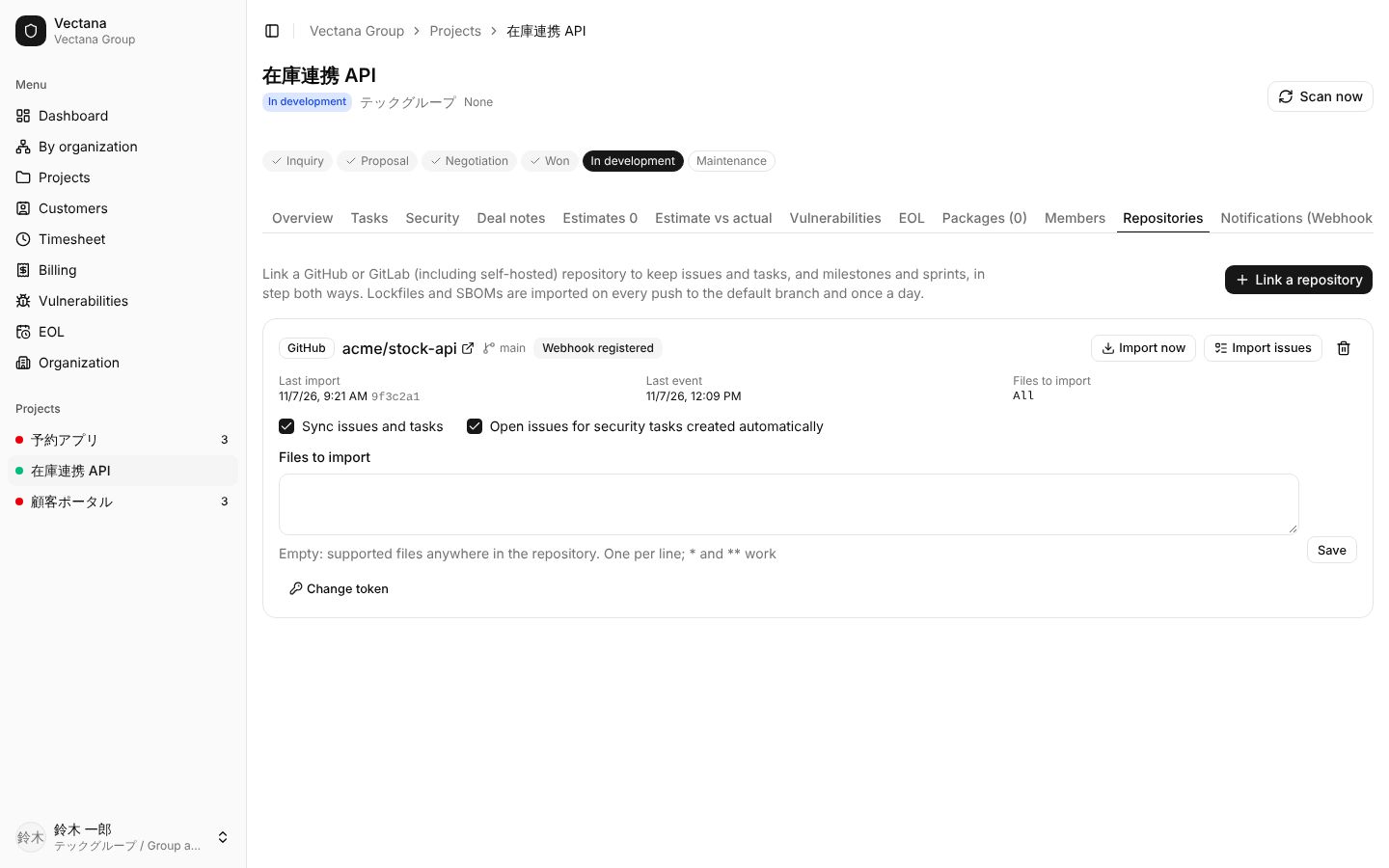
Link a repository
Open the project’s Repositories tab and press Link a repository. The tab is shown to people who can manage the project (project owners, company administrators, department heads, group administrators).
| Field | Meaning |
|---|---|
| Service | GitHub or GitLab |
| Repository | owner/name on GitHub, group/project on GitLab (subgroups allowed) |
| GitHub Enterprise Server / self-hosted GitLab | Tick it and enter the URL: the API URL for GitHub Enterprise (https://HOST/api/v3), the server URL for GitLab (https://HOST) |
| Access token | A token with the permissions below |
| Sync issues and tasks | Off: only import lockfiles |
| Open issues for security tasks created automatically | On by default |
| Register the webhook automatically | On by default |
| Files to import | Empty: the whole repository. See Files to import |
Link first checks that the token can read the repository. Lockfiles, open issues and milestones are then imported in the background.
Token permissions
GitHub: a fine-grained personal access token (or a GitHub App token) with these permissions on the repository:
| Permission | For |
|---|---|
| Contents: Read | Importing lockfiles and SBOMs |
| Issues: Read and write | Syncing issues and milestones |
| Webhooks: Read and write | Registering the webhook (not needed if you add it by hand) |
GitLab: a project access token (or a group or personal token) with the api scope. Registering the webhook needs the Maintainer role or above.
Tokens are stored encrypted and never shown again. When one expires, enter a new one with Change token.
Webhook
The webhook brings issue changes and pushes to Vectana right away. If the token may not register it, the URL and secret are shown on the link so you can add it by hand.
| Service | Where | Settings |
|---|---|---|
| GitHub | Repository Settings → Webhooks | Content type application/json, Secret: the secret shown, events: Pushes, Issues, Milestones, Pull requests |
| GitLab | Project Settings → Webhooks | Secret token: the secret shown, triggers: push, issues and merge request events |
The webhook URL is built from Vectana’s public URL (WEB_URL), which GitHub or GitLab must be able to reach.
Without the webhook, the daily import and the Import issues button still catch up.
Issues and tasks
Vectana → GitHub / GitLab
Tasks created after linking also become issues. Tasks that existed before do not, so linking does not flood the repository.
Changing a task’s title, status, priority, kind, assignee or sprint updates its issue.
| Vectana | Issue |
|---|---|
| Title | Title (security tasks read “Update lodash to 4.17.21”) |
| Status Done | Closed; otherwise open |
| Kind Security / Other | Labels security / other |
| Priority | Labels priority: high / priority: medium / priority: low |
| Assignee | Assignee (people who registered their account name) |
| Sprint | Milestone |
The issue body holds the task’s description and a link back to the task. Issues are written in the display language of the person who linked the repository. Other labels and assignees Vectana does not know stay on the issue.
Fields only Vectana has (estimated hours, points, due date, dependencies, progress) are not sent.
GitHub / GitLab → Vectana
Creating or changing an issue updates its task:
- new issues become tasks (when Sync issues and tasks is on)
- title, open/closed, labels (kind and priority), assignee and milestone are applied
- assignees map to Vectana users by their registered account names. If only unknown accounts are assigned, the task’s assignee is left alone
Tasks show the issue number as a link on the board, in lists and in the task dialog.
Complete on merge
Write Closes #12, Fixes #12 or Resolves #12 in a pull request’s (merge request’s) title or description. When it is merged, the task of issue #12 is completed.
Milestones and sprints
A sprint created in Vectana creates a milestone of the same name (or uses an existing one with that name). Name, end date, goal and closing the sprint follow.
Milestones created on GitHub or GitLab become planned sprints. Close sprints in Vectana, since that freezes the points and returns unfinished tasks to the backlog.
Issues for security tasks
When a security task is created automatically, an issue labeled security is opened. When every vulnerability is resolved and the task completes itself, the issue is closed.
To keep them out of the repository, turn off Open issues for security tasks created automatically on the link.
Lockfiles and SBOMs
On every push to the default branch and once a day, the repository’s lockfiles and SBOMs are imported as packages. Import now imports at any time.
- Supported formats are the same as for uploading. Nothing under
node_modules/orvendor/is read - The source is
git:REPOSITORY/PATH(e.g.git:acme/portal/web/package-lock.json), so each file replaces its own packages - Packages of files gone from the repository are removed. Packages that only moved to another file keep their triage and tasks
- Up to 50 files are read per import
To read only some files, list patterns in Files to import, one per line. * and ** work.
web/package-lock.json
api/**
services/*/go.sum
Uploading from CI still works. If you use both, pick one per file so it is not imported twice.
Account names
Issue assignees map to Vectana users by the user names each person enters under Personal settings → GitHub and GitLab accounts. Case does not matter.
Unlink
Unlink with the trash icon. A webhook Vectana registered is removed. Task–issue links and imported packages stay.
Troubleshooting
The last error is shown on the link.
| Message | What to do |
|---|---|
| Cannot read the repository: … 401 | The token expired or was revoked. Use Change token |
| Cannot read the repository: … 404 | Wrong repository name, or the token has no access to it |
| Webhook not registered | The token may not manage webhooks. Add it by hand with the URL and secret shown |
| Last event does not change | The webhook is not arriving. Check its deliveries on GitHub or GitLab |