Vulnerabilities
How to read findings, severities and fixed versions, and how to track their status.
Vectana looks up vulnerabilities affecting your registered versions in OSV (Open Source Vulnerabilities), which aggregates GitHub Security Advisories, the PyPI advisory database and other major sources.
Reading the list
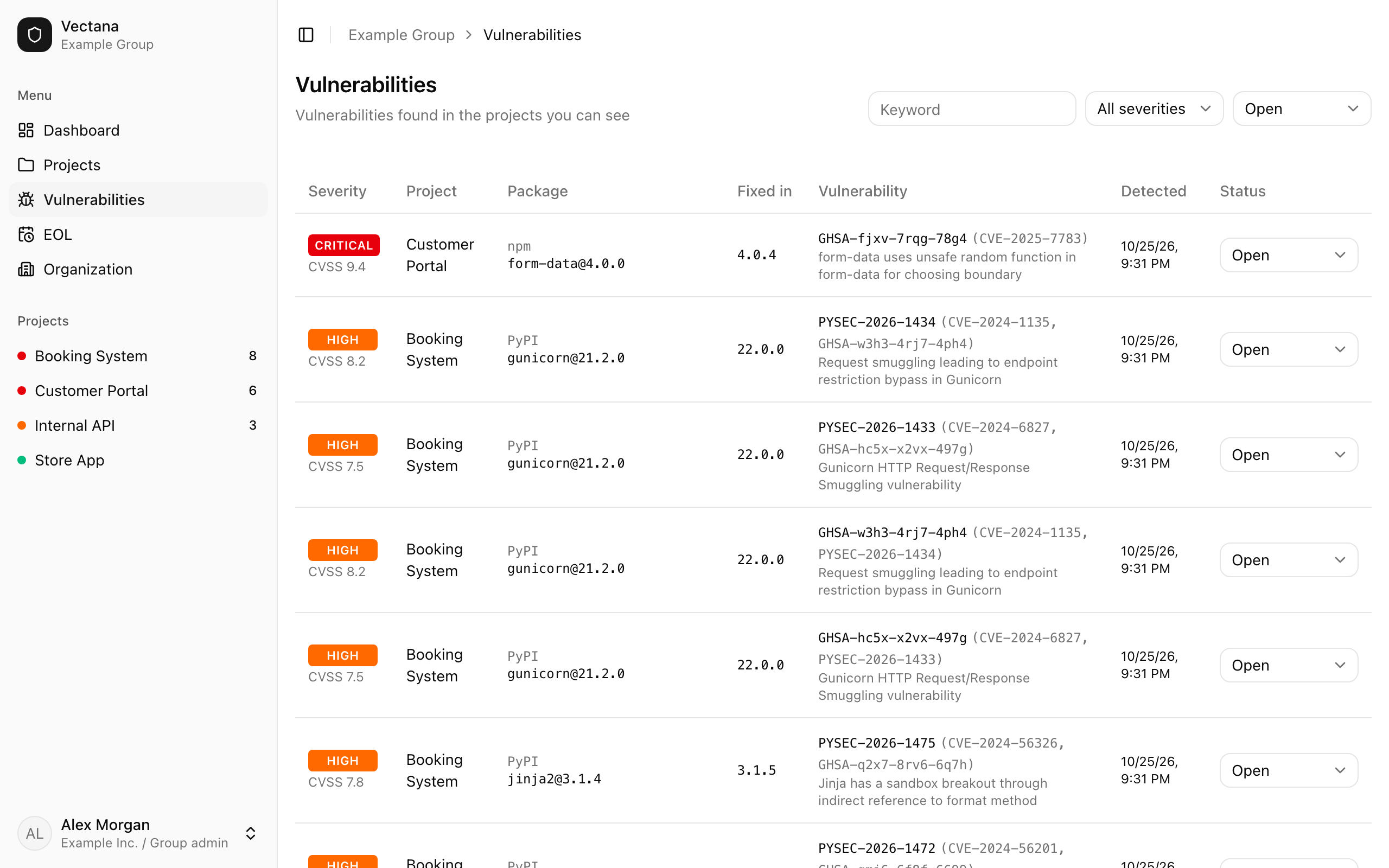
“Vulnerabilities” in the sidebar lists findings across every project you can see. A project’s “Vulnerabilities” tab shows only that project.
| Column | Meaning |
|---|---|
| Severity | CRITICAL / HIGH / MEDIUM / LOW / UNKNOWN, plus the CVSS score when known |
| Project | The affected project |
| Package | Ecosystem, package name and version |
| Fixed in | The smallest fixed version newer than yours. Upgrading to it resolves the issue |
| Vulnerability | The advisory ID (GHSA, PYSEC…), aliases such as the CVE, and a summary. Click the ID to open it on osv.dev |
| Detected | When Vectana first found it |
| Status | How you’re handling it |
The list is sorted by severity. Filter by keyword, severity and status at the top right.
About severity
Vectana prefers the rating in the advisory itself (GitHub’s Critical / High / Moderate / Low, for example). Without one, it uses the CVSS score: 9.0 or higher is CRITICAL, 7.0 or higher HIGH, 4.0 or higher MEDIUM, and anything lower LOW. With neither, the severity is UNKNOWN.
Track the status
Change each finding’s status to record what you’ve done.
| Status | Use it when |
|---|---|
| Open | It was just found. Counted on the dashboard |
| Acknowledged | You’ve looked at it — still investigating, or waiting for an update |
| Ignored | It doesn’t affect you (you don’t use the affected feature, for example) |
Acknowledged and ignored findings aren’t counted as open on the dashboard and aren’t notified. Members and above can change the status.
Resolve it
Upgrade the package to the fixed version or later, then import the new lockfile. When the old version is no longer registered, its findings go away.