Use from AI (MCP)
Triage vulnerabilities and work with projects, estimates, tasks, hours and invoices from AI clients such as Claude, using a personal token and the Vectana MCP server.
Vectana has an MCP server so AI clients such as Claude Desktop and Claude Code can work with it. Ask in plain words: “summarize the CRITICAL vulnerabilities assigned to me”, “import this package-lock.json into the internal tool project”, “create an initial estimate for the ACME deal”.
The AI acts with your permissions. Projects you cannot see and fields you cannot change stay hidden and read-only for the AI too.
Issue a personal token
Issue one under Personal settings → Personal tokens (AI and scripts).
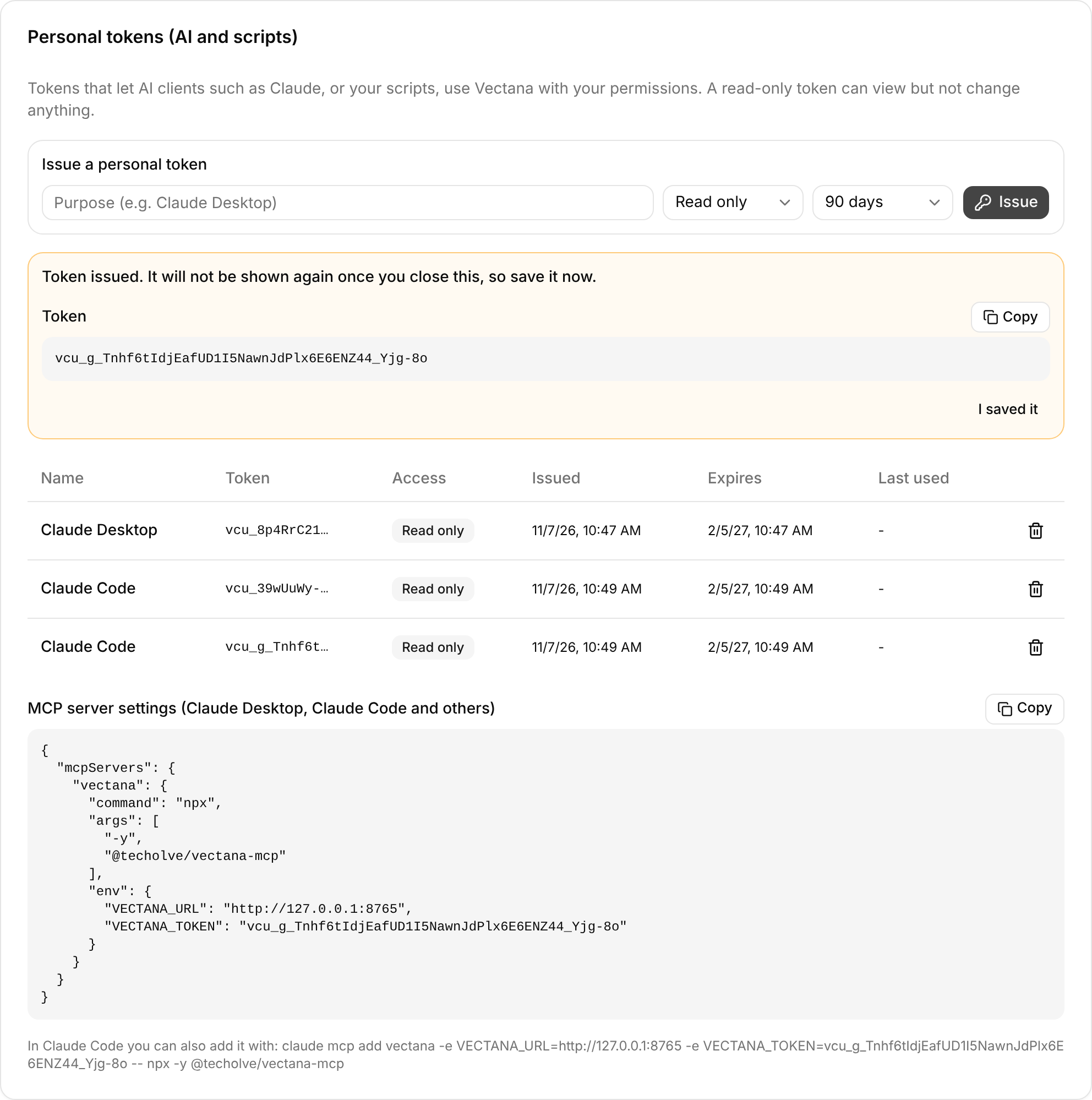
- Enter what it is for (e.g.
Claude Desktop) - Choose its access
- Read only: view lists and details only; nothing can be added or changed
- Read and write: everything you can do yourself
- Choose an expiry and press Issue. The token (starting with
vcu_) and MCP settings are shown
We recommend starting with Read only and switching to Read and write once you are comfortable. A personal token cannot issue or revoke tokens.
Add it to your MCP client
Claude Desktop and others
Add this to the settings file (claude_desktop_config.json for Claude Desktop). You can copy it from the page where you issued the token.
{
  "mcpServers": {
    "vectana": {
      "command": "npx",
      "args": ["-y", "@techolve/vectana-mcp"],
      "env": {
        "VECTANA_URL": "https://vectana.example.com",
        "VECTANA_TOKEN": "vcu_..."
      }
    }
  }
}
Claude Code
claude mcp add vectana \
  -e VECTANA_URL=https://vectana.example.com \
  -e VECTANA_TOKEN=vcu_... \
  -- npx -y @techolve/vectana-mcp
Node.js 20 or later is required.
Environment variables
| Variable | Meaning |
|---|---|
VECTANA_URL |
Your Vectana URL (required) |
VECTANA_TOKEN |
Personal token (required) |
VECTANA_LOCALE |
ja or en: language of error messages |
VECTANA_READ_ONLY |
Set to 1 to offer only read tools to the AI |
What it can do
| Area | What you can do |
|---|---|
| Dashboard | Read your dashboard and the organization dashboard |
| Vulnerabilities | List and view, change status, assignee and due date, comment |
| Packages | List, add by hand, import lockfiles and SBOMs, scan now |
| EOL | List EOL findings, list and add runtimes |
| Projects | List and view, create and update (including deal stages), assign members |
| Customers | List and view, create and update, add contacts |
| Estimates | List and view, create and update (with lines) |
| Tasks | Your tasks, project tasks, create and update, create security tasks |
| Sprints | List, burndown, velocity, create and update |
| Timesheet | View a week, log a day’s hours, save or submit a week, estimate vs actual |
| Deal notes | List, add (next actions become tasks), update |
| Billing | Project invoices, invoice list (accounting), plan invoices, record invoiced and paid |
| Repositories | List linked repositories, import lockfiles and SBOMs now, import issues |
To import a lockfile or SBOM, just give the path of the file on the computer running the AI client (supported formats).
Example requests
- “List my overdue vulnerabilities in Vectana”
- “Import
./package-lock.jsoninto the internal tool project and scan it” - “lodash’s vulnerability does not affect us: set it to ignored and leave the reason as a comment”
- “Create security tasks for the vulnerabilities that have none and assign them to me”
- “Create an initial estimate for the ACME deal: basic design 10 person-days, detailed design 15”
- “Look at the current sprint’s burndown and tell me whether we will finish”
- “Log 6 hours on the customer portal’s API design and 1 hour of internal meetings for today”
- “List this month’s overdue invoices”
- “Re-import the lockfiles from the stock API’s repository”